Repository navigation
关于 Status Bars 显示 Java Build Status 的问题 #1179
Description

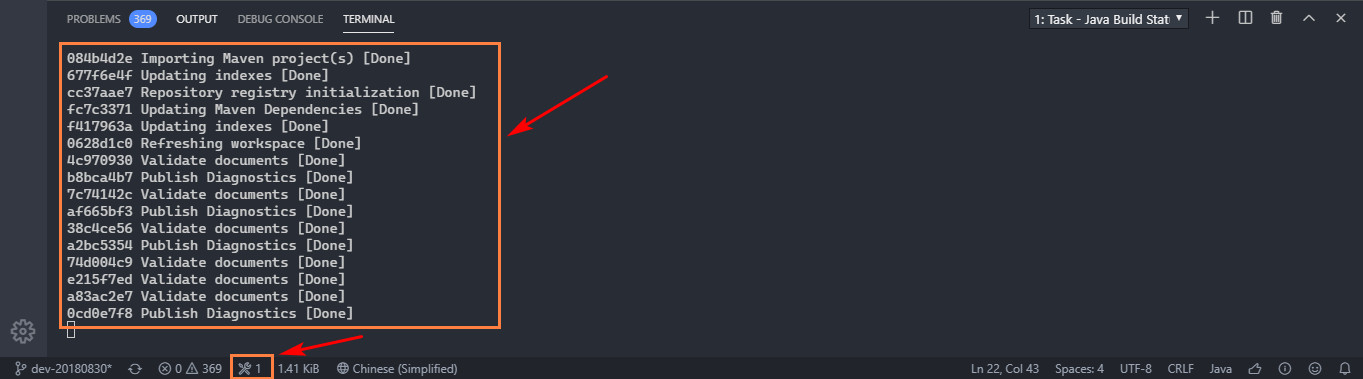
更新 Language Support for Java(TM) by Red Hat 插件后,原先在tate Status Bar 动态显示的 Java build status 改为在新的 terminal 里显示,很不直观,希望可以修改为之前版本那样在tate Status Bar 动态显示 Java build status ,或者增加选项让用户自主选择。
Extension version: 0.54.1
VS Code version: Code 1.40.2 (f359dd69833dd8800b54d458f6d37ab7c78df520, 2019-11-25T14:54:45.096Z)
OS version: Windows_NT x64 10.0.17134
Activity
EminemRap commentedon Dec 5, 2019
还有一点,就是每次打开新的项目窗口,都会自动弹出 Java Build Status 的 Teminal 窗口,确实有点碍眼。真心希望将这个功能点改回老版本的样子,辛苦!谢谢!
akaroml commentedon Dec 5, 2019
谢谢你的反馈。原先的方法有个缺陷,Status Bar只有一个,但是后台的build job有很多个,所以大家争抢同一个位置,导致任何一个job的信息都没法完整显示。
该改进是利用了terminal来实现同时显示多个job,让用户更加直观地观察到build的状态,这在打开大工程的时候会很有帮助。
关于自动弹出的问题,我们会加一个选项来让用户决定是否关闭这个行为。
EminemRap commentedon Dec 5, 2019
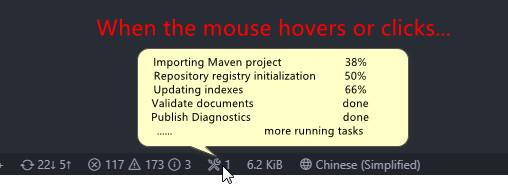
@akaroml 我可能有些贪心😅,不知道 VS code 能不能支持实现如图中所示的功能?
fbricon commentedon Dec 5, 2019
Guys, can you please use English?
akaroml commentedon Dec 5, 2019
I want that too! But vscode takes full control of the UI capabilities and that's not going to happen shortly.
akaroml commentedon Dec 5, 2019
Sorry about that, Fred. What @EminemRap was saying is he liked the old way of showing job status. And I explained why we made the change. Later he proposed this:
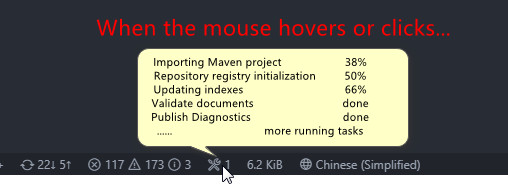
This is exactly our original idea!!! But it's not going to happen shortly.
He was also asking for a setting entry to not popping the terminal on start, tracked by #1181
EminemRap commentedon Dec 5, 2019
@akaroml 是我太贪心了。谢谢你耐心的解答以及对我需求的跟进,辛苦!
robstryker commentedon Nov 6, 2026
Closing old issues.